PDF Reader - PDF Editor1.7.2
Publisher Description

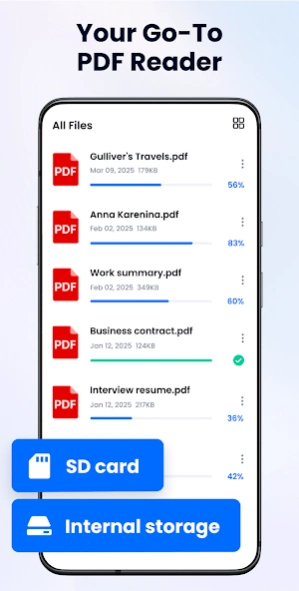


PDF Reader - All PDF file, document read & manage by PDF Viewer for android fast
Looking for a
simple
and easy-to-use document reading app? PDF Reader - PDF Editor is exactly what you need! It can
auto scan
, find, and
list all PDF and office files
on your phone, allowing you to fast open, read and manage your files
in one place
conveniently.
PDF Reader - PDF Editor supports ultra-fast reading files
in all formats
, documents, receipts, photos, business cards, whiteboards, and office files like Word, Excel, PPT, and TXT (even password-protected files). It is not only a reading app, you can also use it to highlight text, create formatted text notes, add e-signatures, bookmark PDF pages. It's also a PDF scanner that can scan images and convert to PDF; sharing PDF files with others is also very easy.
Download this superior office app to support your work and study, you will have a
PDF viewer, ebook reader, PDF editor, PDF scanner
at the same time.
Simple, free, and lightweight, really worth a try!
👉👉👉Download PDF Reader - PDF Editor and enjoy all features for free now!
*
Free Reader App
*
✨Auto scan and find all PDF, Word, Excel, PPT, and TXT files on your phone
✨Support opening password-protected/encrypted files in multiple formats
✨Quickly search files and texts by keywords
✨Display PDF files in grid or list view
✨Fast open and view documents
✨Bookmark PDF pages
✨One-tap switch between light and dark mode
*
Handy PDF Viewer
*
👏Page by page and continuous scrolling mode
👏Horizontal and vertical viewing mode
👏Read smoothly with Reflow mode
👏Go to the desired page directly
👏Search for text in PDF and copy easily
👏Zoom in and zoom out pages
👏Eye comfort mode
*
Practical PDF Editor
*
✒️Insert, rotate, extract, or delete PDF pages
✒️Add or delete text in PDF files
✒️Adjust font size, color, and layout
✒️Insert and edit images
✒️Annotate and doodle on PDF files
✒️Highlight, underline, and strikethrough to take notes
✒️Add e-signatures to PDF files
✒️Easily copy any text on a PDF file
*
Rich PDF Tools & Creation
👍Text to PDF - Convert text notes into well-formatted PDFs for easy export and sharing
👍Two-way image to PDF conversion
👍Quickly split or merge PDF files
👍Compress PDF files to reduce their size
👍One-tap recovery of deleted files from the recycle bin
*
Powerful PDF Manager
*
📅
Recent
- All recently opened files are displayed in order for your quick reference.
🔒
Lock
- Set password to lock PDF files and protect them from prying eyes.
💡
Delete/Rename/Favorite
- You can rename files, delete files, and add files to Favorite.
🤝
Share
- Share files with others and collaborate conveniently.
🖨️
Print
- Print PDF files quickly from your phone.
📂
Create folder
- Create multi-level folders, support quick file import.
♻️
Move files
- Move files freely and manage them more conveniently.
#
Features coming soon
#
✔ Fill PDF forms
✔ Word to PDF
✔ Fast conversion between PDF and Word, Excel, etc
…
Permission Required
To read and edit documents on your device, Android 11 and above users need to allow MANAGE_EXTERNAL_STORAGE permission. We only use this access to support app functionality, ensuring your data stays secure and private.
We will keep working hard to optimize the app and improve the user experience. Please feel free to contact us at pdfreaderfeedback@gmail.com if you have any suggestions.
PDF reader free
Looking for a powerful PDF reader free? PDF files can be annotated, scanned and sent with PDF reader free. This app is exactly what you need!
Read all PDF
PDF reader app is also a powerful PDF viewer. With just one click, PDF reader app makes it easy to improve your work efficiency! Try PDF reader app now to organize your PDFs!
About PDF Reader - PDF Editor
The company that develops PDF Reader - PDF Editor is Simple Design Ltd.. The latest version released by its developer is 1.7.2.
To install PDF Reader - PDF Editor on your Android device, just click the green Continue To App button above to start the installation process. The app is listed on our website since 2026-09-28 and was downloaded 11 times. We have already checked if the download link is safe, however for your own protection we recommend that you scan the downloaded app with your antivirus. Your antivirus may detect the PDF Reader - PDF Editor as malware as malware if the download link to pdf.reader.pdfviewer.pdfeditor is broken.
How to install PDF Reader - PDF Editor on your Android device:
- Click on the Continue To App button on our website. This will redirect you to Google Play.
- Once the PDF Reader - PDF Editor is shown in the Google Play listing of your Android device, you can start its download and installation. Tap on the Install button located below the search bar and to the right of the app icon.
- A pop-up window with the permissions required by PDF Reader - PDF Editor will be shown. Click on Accept to continue the process.
- PDF Reader - PDF Editor will be downloaded onto your device, displaying a progress. Once the download completes, the installation will start and you'll get a notification after the installation is finished.
Program Details
System requirements
Download information
Pricing
Version History
version 1.7.2
posted on 2026-09-28
🚀 New Features: Easier Document Conversion & Access
🔄 Format Conversion: Added PDF to Word and Word to PDF for flexible file conversion
📌 Add to Home Screen: Create file shortcuts on your home screen for quick access
✅ Experience Improvements
✨ Fixed known issues and improved overall performance
version 1.7.0
posted on 2026-09-11
🚀 New Feature: Better Document Management!
📃 Multi-Format Support: Easily access PDF, Word, PowerPoint, Excel, TXT, and CSV files
✅ Experience Improvements
⚡️ Improved file browsing, PDF editing, and compatibility with encrypted documents
🎨 Enhanced the preview and editing interface for a smoother experience
✨ Fixed known issues and improved overall performance
version 1.6.6
posted on 2026-08-27
🚀 New Features: Convert & Organize With Ease!
📄 Text to PDF: Convert text into well-formatted PDFs for export and sharing, making writing and text handling easier
📁 Quick Import to Folder: Import files directly into your folders for easier organization
✅ Experience Improvements
✨ Fixed known issues and improved overall performance
version 1.6.5
posted on 2026-04-24
🌟 Fixed minor bugs
🌟 Improved user experience
version 1.6.2
posted on 2026-03-27
🌟 Add "Create folder" feature based on user feedback
🌟 Support switching background color
🌟 Fix minor bugs
🌟 Improve user experience
version 1.6.1
posted on 2025-12-30
version 1.5.9
posted on 2025-10-21
🌟 Add "Signature" feature based on user feedback
🌟 Support for inserting and editing image
🌟 Fix minor bugs
🌟 Improve user experience
version 1.5.6
posted on 2025-10-11
🌟 Add "Edit text" feature based on user feedback
🌟 Fix minor bugs
🌟 Improve user experience
version 1.5.4
posted on 2025-07-21
🌟 Add "Manage Pages" feature based on user feedback
🌟 Fix minor bugs
🌟 Improve user experience
version 1.5.2
posted on 2025-05-19
🌟 Add "Recycle Bin" feature based on user feedback
🌟 Support permanently deleting files from the device
🌟 Fix minor bugs
🌟 Improve user experience
